
Managing multiple websites can be tough, but with HostAnyTime, it’s a piece of cake. As your online presence grows, managing multiple websites becomes a real pain. That’s where HostAnyTime comes in, giving web owners a solid solution for managing multiple sites. You just have to focus on growing your online empire because our platform is super high-tech.
With HostAnyTime, you can manage all your websites from one dashboard, whether you’re a pro or just starting an online Business. With HostAnyTime, you’ll never have to worry about managing multiple hosting accounts again.
The challenge of managing multiple websites
Even pro web admins struggle to manage multiple websites. It’s hard to handle and protect all these different platforms. It’s tough to keep all the sites consistent and high-quality because each one needs its own attention.
It’s hard to keep up with ever-evolving web technologies and SEO best practices. What works for one site might not work for another, so each property needs a customized approach. Managing user experiences, tracking analytics, and fixing technical problems get exponentially more complicated when you have a website.
Using efficient systems and maybe specialized tools for managing multiple websites can make managing them easier. With a strategic approach and streamlined processes, you can turn managing multiple websites into a way to grow and grow your online business.
Website management is easier with HostAnyTime
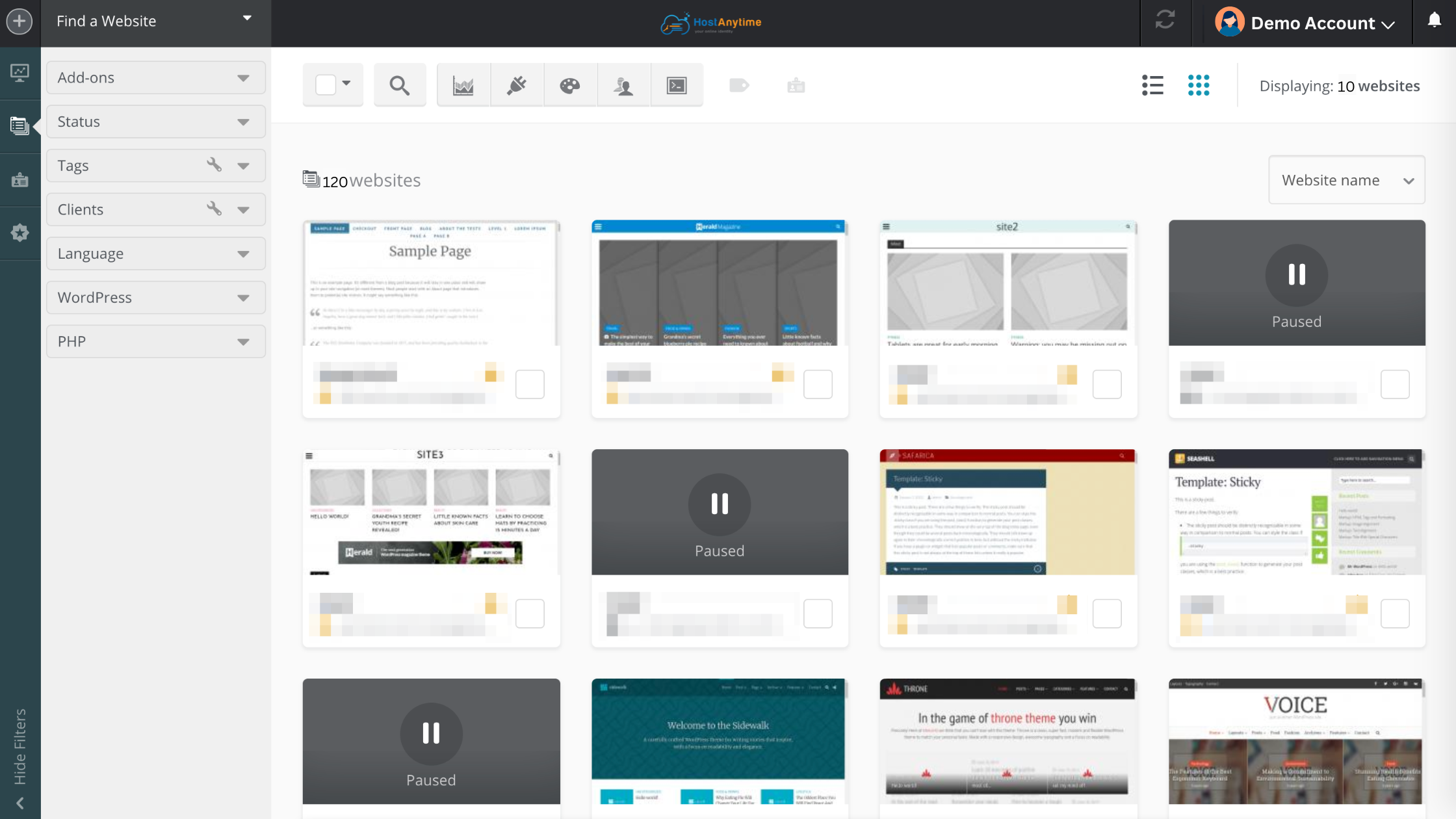
Intuitive control panel
HostAnyTime has a control panel that puts all your websites in one place. With this user-friendly interface, you can manage everything in one place. No more wasting time migrating back and forth between dashboards.
Automated migration tools
Switching to HostAnyTime is super easy with its automated migration tools. If you’re switching hosts or combining multiple accounts, don’t worry – we’ll ensure there’s little to no downtime.
Robust Security Features
Security is a big deal when handling lots of websites. With HostAnyTime, you get advanced security features like automated backups, DDoS protection, and SSL certificates. These features keep your websites safe, so they’ll always work, and you won’t have to worry.
Enhancing Productivity and Growth
Easy File Management
You won’t believe how efficient the file management tools are on HostAnyTime’s platform. It’s easy to upload, edit, and organize files so you can effortlessly maintain your websites. This makes it easier for you to focus on content and talking with clients.
Scalable Hosting Plans
The more your business grows, the more web hosting you’ll need. HostAnyTime has hosting plans that can grow with you. Whether you’re managing ten or a hundred websites, we’ve got a plan that suits your needs with great performance and cost savings.
Real-Life Success: Microdeft’s Journey
Rakib Islam of Microdeft, a software company, used HostAnyTime to handle 120+ websites successfully. With HostAnyTime, he could streamline operations, keep clients happy, and focus on growing his business with no technical headaches.
Conclusion
Managing multiple websites isn’t a big deal. With HostAnyTime’s hosting solutions offer an easy-to-use interface, strong security, and flexible plans that can grow with your needs. Make your website management easier and watch your business grow.
Here are some trending FAQs related to “Managing Multiple Websites,” covering common questions, challenges, and best practices:
FAQs
Q1: Why would someone manage multiple websites? What are the benefits?
A1: People manage multiple websites for various reasons, including:
- Audience Segmentation: Targeting different niche audiences or market segments with tailored content and branding.
- Product/Service Specialization: Creating dedicated sites for distinct products or services to enhance SEO and user experience.
- Brand Expansion: Building a broader online presence and reaching new demographics.
- Diversification of Revenue Streams: Not relying on a single website for income.
- Testing and Innovation: Using separate sites as “sandbox environments” for A/B testing new designs or marketing strategies.
- Risk Management: Diversifying digital assets reduces the risk of total business disruption from issues on a single site.
Q2: What are the biggest challenges in managing multiple websites?
A2: While beneficial, managing multiple websites comes with its challenges:
- Resource Allocation: Each site demands dedicated time, effort, and potentially financial resources for content, maintenance, and updates.
- Brand Consistency: Maintaining a consistent brand identity and messaging across all sites can be difficult.
- Duplicate Content Issues: Ensuring unique and valuable content for each site to avoid SEO penalties.
- SEO Complexity: Managing individual SEO strategies, keyword research, and performance tracking for each site.
- Security Risks: Increased surface area for potential cyber threats, requiring robust security measures across all properties.
- Technical Management: Juggling different platforms, logins, updates, and potential technical issues across multiple sites.
- Scalability: Ensuring that the infrastructure and management processes can handle growth across all websites.
Q3: What are the best tools or platforms for managing multiple websites efficiently?
A3: Several tools and platforms can streamline multi-website management:
- Multi-site Content Management Systems (CMS): Platforms like WordPress Multisite, Joomla, or custom headless CMS solutions allow you to manage multiple sites from a single dashboard.
- Website Management Tools/Plugins: Tools like ManageWP, MainWP, InfiniteWP, or Jetpack offer centralized dashboards for updates, backups, security scans, and performance monitoring across multiple WordPress sites.
- Analytics Tools: Google Analytics, Matomo, or Ahrefs help track performance, user behavior, and SEO metrics across all your properties.
- Project Management Tools: Asana, Trello, or ClickUp can help organize tasks, schedules, and team collaboration for content creation, updates, and maintenance.
- Password Managers: Securely storing login credentials for numerous sites.
- Automation Tools: For tasks like backups, updates, and social media posting.
Q4: How can I ensure brand consistency across all my websites?
A4: Maintaining brand consistency is crucial:
- Standardized Brand Guidelines: Develop clear guidelines for colors, fonts, tone of voice, imagery, and messaging to be applied across all sites.
- Centralized Media Libraries: Use a shared repository for logos, images, and other brand assets.
- Template-Based Design: Utilize consistent themes, templates, or design systems that can be reused across sites.
- Consistent User Experience (UX): Ensure similar navigation, site structure, and overall user flow to provide a cohesive experience.
- Regular Audits: Periodically review each site to ensure adherence to brand standards.
Q5: What are the SEO best practices for managing multiple websites?
A5: SEO for multiple sites requires a strategic approach:
- Targeted Keyword Research: Conduct specific keyword research for each site based on its unique niche and audience.
- Unique Content: Absolutely avoid duplicating content across your sites. Each site should offer distinct, high-quality, and valuable content.
- Internal Linking Strategy: Strategically link between your related websites to share domain authority and improve visibility (ensure links are natural and relevant).
- Dedicated SEO Strategies: Develop a distinct SEO strategy for each website, focusing on its specific goals and target keywords.
- Monitor Performance Individually: Use analytics tools to track the SEO performance of each site separately to identify strengths and weaknesses.
- Optimize for Local SEO: If applicable, optimize individual sites for specific geographic locations.
Q6: Should I use a single CMS for all my websites or different ones?
A6: This depends on your needs:
- Single CMS (e.g., WordPress Multisite): Offers centralized management, consistent updates, and often lower maintenance costs. Ideal when sites are closely related, share similar functionalities, or are managed by the same team.
- Different CMS (or separate instances): Provides more flexibility and independence for highly distinct websites with different technical requirements, functionalities, or management teams. However, it increases management complexity and potential costs.
Q7: How do I manage content creation and updates for multiple sites?
A7: Effective content management is key:
- Centralized Content Plan: Develop a content strategy and calendar that spans all your websites, outlining topics, posting schedules, and content types for each.
- Content Repurposing (Strategic): Adapt successful content from one site for use on another, but always ensure it’s re-imagined and tailored for the new audience to avoid duplicate content.
- Team Collaboration Tools: Use tools to coordinate content creation, editing, and publishing among team members.
- Automated Publishing: Leverage CMS features or third-party tools to schedule and automate content updates.
- Regular Content Audits: Review existing content across all sites to ensure accuracy, relevance, and freshness.


One Response