

Transfer Site to a Different Easiest Website Builder- Easy steps
Having a beautiful & organized website is a dream for a website holder. But it’s only possible if you choose the best website builder.
Most beginners have the wrong idea about website builders, thinking that building a website is kind of like learning how to code.
But come on, we are in the modern world, and coding days are in the past. Get out of the mist and let you know the easiest way to build a website and have a unique website.
The more your website is professional, the more traffic you get. To make sure that traffic is permanent at a very low cost, we are going to introduce you to the most famous easy website maker, HostAnyTime’s website builder.
HostAnyTime offers the fastest and cheapest web hosting plans, ensuring your website’s success. It provides both web hosting and domain services.
But it has a 99.9% uptime guarantee and full network reliability. So, with HostAnyTime, your pages load faster, and more visitors convert to customers.
If you have already built your website but now want to change your website builder, Is it impossible?
The answer is “NO, it is a very easy step & possible. In this article, we are going to show you six easy steps for transferring your website to a different drag and drop website builder that no coding required.
Let’s dive deeper and go through each one…
Purchasing a new hosting website
At first, you decide which website you will choose to get your website a much better reach. There will be so many websites in options, but you should choose the one that perfectly matches your budget and needs.
Your online identity is crucial to succeed in your online business. You need a website that is attractive, professional, and easy to navigate.
If you are confused, then look into the Hostanytime and overview the best offers given. They offers many types of hosting such as cPanel hosting, Plesk hosting, WordPress hosting, Business hosting, VPS hosting, and dedicated server This website will help you to get out of confusion and will provide you with the best cheap website builder.
Here are some services Hostanytime gives you to reach your goal
- Cheap website builder
- Web hosting services
- Tools and Guidelines
- 24/7 customer support
After researching the best website builder, whenever you’ve decided and selected a hosting plan, take a moment to set up your hosting account. This is a pretty simple process and will take a little time to complete. You can find guidelines on how to set up your hosting account in your selected easy website builder.
Download your backup files
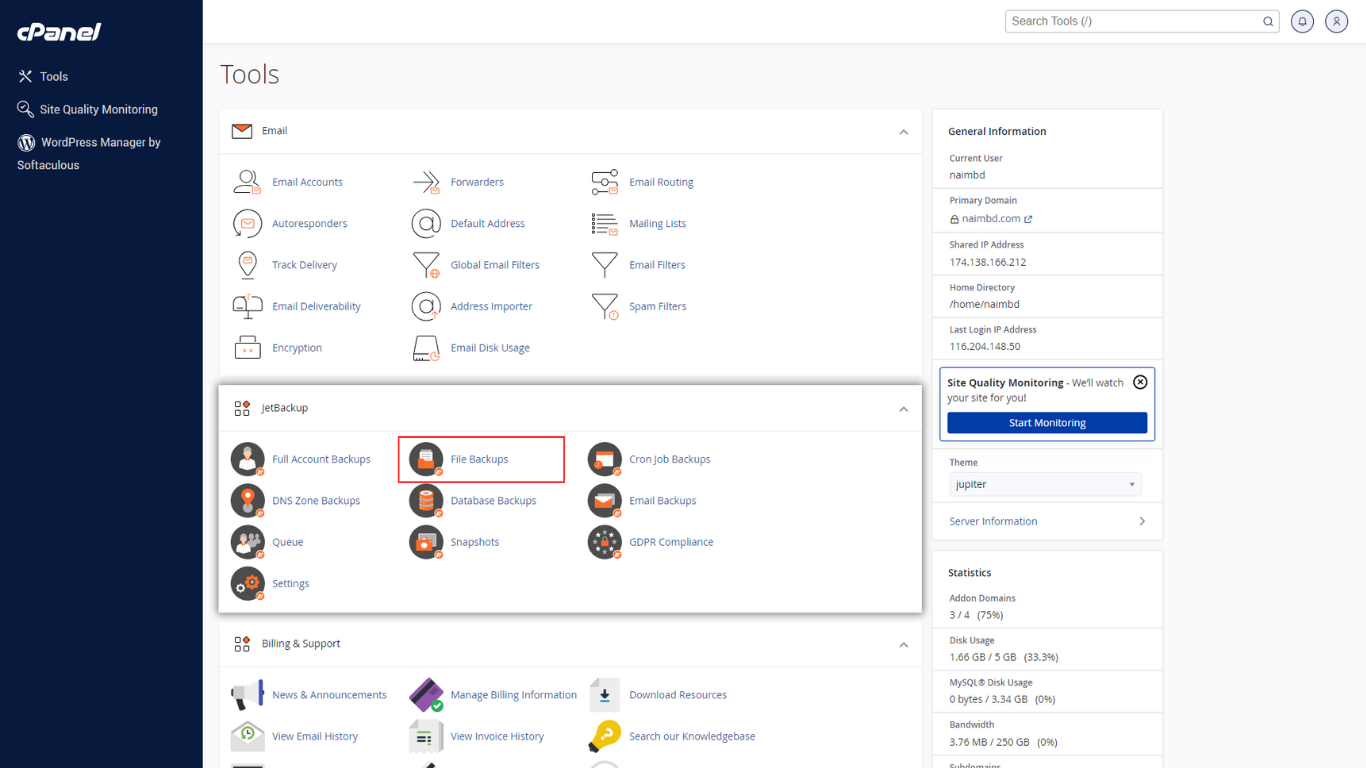
Now you save and back up your website’s files. If you get access to your hosting account’s cPanel, it will be better for you to use the File Manager tool and download a full copy of your website files to your PC.
If you don’t have access to cPanel then you can also choose an FTP client like FileZilla to connect to the hosting account and download the website files.
Website creation actually depends on your current web hosting provider. But the process looks like this:
Navigate to File Manager > Back up your website > Create the Backup.
Once the backup is done, then download it to your computer. Point to be noted: download the most recent version.
Plan your new site structure
Your site structure is the actual form of your navigation plan. Whatever your element of structure is all implied in the real page. In detail, the website structure is the star map of your website. Here, the stars are your products.
By selling those stars, you will reach potential customers. To ensure the website structure is simple and easily acceptable to your customer, It is your first priority to present the website more uniquely and make the customer satisfied.
Want to know how to structure your website and where to Start? In this article, you can easily find the answer.
Website planning structure is a very time-consuming process. The four main website structures are hierarchical, sequential, matrix, and database. Knowing the website structure deeply is important for optimizing user experience and SEO.
5 tips for creating a good website structure:
- Research your competitor and competition.
- A to Z Identify your structure and write down all categories that you need to include in your website.
- Make a diagram of user flow.
- Research internal linking.
- Create a model map.
[Tips: Check out Hostanytime and get the best site structures]
Importing files and database
It seems quite time-consuming to migrate your website to another website builder. If you make any mistake, you may even need to start again. In this article, we are going to show you how easily you’re gonna migrate your website to another website builder.
First, get access to the Import feature.
To start working with the Website Builder, get access to the import feature. If you have cPanel or FileZilla go through the import process of each feature. Or you can also check Hostanytime. Here, you can get the best suggestions for importing databases.
Validation of Proceeding
For functional import processing, it is important to ensure that the website owner ignores copyright issues and that the content is secure.
There are three ways you can use it to import your website.
- HTTP.
- META.
- DNS.
Once you choose a method to import data using the included process, click on confirm and import.
When the ownership is confirmed, the website files and database are imported into the Website Builder, where they can be modified next.
Choose your domain name and point it to the new server
The next step is to update your website’s DNS settings. It will allow the internet where to find your website’s new hosting account. If you don’t know about DNS, let’s clear it for you.
For example, every person has their own name. By their name, we can recognize them. It’s the same as anyone’s name; a domain name also works for websites in plain English. A domain name is something that a user types into a web browser to reach a particular site. The domain name for Google is google.com.
For this, first, ask your new provider if it is eligible to transfer a domain or if you have to forward it. If you can transfer, that’s great. If not, you have to forward your domain.
However, the fact is that transferring the domain will take time. This can take a few steps, so we’ll be happy to help you out with our website. If you purchased your DNS name through Hostanytime, you can get much more support than others. Because,
- HostAnyTime is trusted by over 15 million users worldwide who have registered plus 62 million domains.
- We offer a reliable domain registration service that gives instant activation, live support, and DNS management.
- At HostAnyTime, we place the highest priority on your website’s privacy, security, and online rights. Our mission is to ensure that the Internet remains open, free, and safe for all.
Update DNS settings to log in to your Hostanytime account. To succeed in your website career, choosing the right path is all up to you. So make sure you succeed. Hostanytime is always by your side. That’s it! Once everything is up, start running.
Review your site before it goes live
After transferring your website to the best online website builder, it’s important to ensure everything is working properly before publishing your website.
Make sure after completing all the steps successfully. Now, look around and check that both the front and back end work as you planned. Doing this also helps to explore the mistakes you have in your website before the site goes live.
Check the different sections to get a feel of your new control panel. Ensure that all the settings are configured. From the front to end, browse all of your website’s pages, content, images, text, and videos load smoothly.
Also, check if all features, like forms, work properly. At Hostanytime, you will get all the facilities mentioned in the article. Make sure to check out the website.
If you find no errors, you are finally done with the hosting transfer process. Best wishes to you.


8 Responses
Superb blog! Do you have any tips and hints for aspiring writers?
I’m planning to start my own site soon but I’m a little lost
on everything. Would you recommend starting with a free platform like
Wordpress or go for a paid option? There are so many
choices out there that I’m totally overwhelmed ..
Any recommendations? Cheers!
I have been surfing online more than 3 hours today, but I never found any fascinating article like yours.
It is lovely worth sufficient for me. Personally, if all web owners and bloggers made excellent
content as you probably did, the internet shall be much more helpful than ever before.
Great weblog right here! Also your web site a lot up fast!
What host are you the usage of? Can I get your affiliate hyperlink on your host?
I wish my site loaded up as fast as yours lol
Every weekend i used to pay a visit this web page, because i want enjoyment, for the reason that this
this website conations actually fastidious funny material too.
This design is wicked! You certainly know how to keep a reader amused.
Between your wit and your videos, I was almost moved to start my own blog (well, almost…HaHa!) Fantastic job.
I really loved what you had to say, and more than that,
how you presented it. Too cool!
Hello! I realize this is sort of off-topic however I needed to ask.
Does managing a well-established blog such as yours take a large amount of
work? I’m brand new to blogging however I do write in my diary on a daily basis.
I’d like to start a blog so I will be able to share my experience
and views online. Please let me know if you have any suggestions or tips for brand new aspiring
blog owners. Thankyou!
It is in point of fact a nice and helpful piece of info.
I am satisfied that you shared this helpful info with us.
Please stay us informed like this. Thanks for sharing.
I have been exploring for a little bit for any high
quality articles or weblog posts on this kind of house .
Exploring in Yahoo I ultimately stumbled upon this website.
Reading this information So i’m glad to show that I’ve a very just right uncanny feeling I found out just what I needed.
I such a lot for sure will make certain to do not put out of your mind this
site and give it a glance on a relentless basis.